OFTP2 Connection
Introduction to the Odette File Transfer Protocol (OFTP2)
OFTP2 (Odette File Transfer Protocol) is a peer-to-peer protocol which addresses the requirements of electronic data interchange (EDI) in the automotive industry. Beginning in the 80s the first version of OFTP was developed to work with X.25. The current version OFTP2 is based on TCP instead of X.25 or ISDN to match the demand for EDI over the Internet.
Unlike the typical server-client based protocols like REST, AS2 ... an OFTP2 entity is capable to exchange files in both directions. So each entity can either push or pull files to/from the partner. Depending on their role we speak of speakers or listeners.
Each OFTP2 station is defined by a combination of its hostname, Port and Odette Identification Code. This identification allows to run more than one station on the same host (sub-level addressing).
Odette Identification Code
An Odette Identification Code is strongly restricted with its allowed values and its length. Each Odette Identification Code consists of 4 parts:
| Position | Name | Allowed Values | Description |
|---|---|---|---|
| 0 | ODETTE Identifier | [A-Z] [0-9] | "O" indicates an ODETTE assigned Organisation Identifier. Other values may be used for non-ODETTE codes |
| 1 | International Code Designator | [0-9] | The first part of the Organisation Identifier contains 4 digits |
| 5 | Organisation Code | [A-Z], [0-9] and - | A code forming part of the Organisation Identifier |
| 19 | Computer Subaddress | [A-Z], [0-9], / - . & ( ) | A locally assigned address that uniquely identifies a system within an organisation (defined by an Organisation Identifier) |
Examples for valid Odette Identification Codes:
- O0039OEMCOMPANY
- O0055SUPPLIER1
- O0013000003ROBBOSCHRBFE02
- O0013PIDEV
- O1300000NURHAN
- O0013PIDEV
Security Features
OFTP2 provides several features to ensure file integrity, authenticity and non-repudiation:
- TLS encrypted connection
- Message encryption
- Message signature
- Message compression
- Signed receipts
- Partner Authentication (certificate or password)
OFTP2 Protocol Overview
The following diagram shows a typical file transmission between two OFTP2 stations. The diagram shows how a file is send from OFTP2 station "A" to OFTP2 station "B".
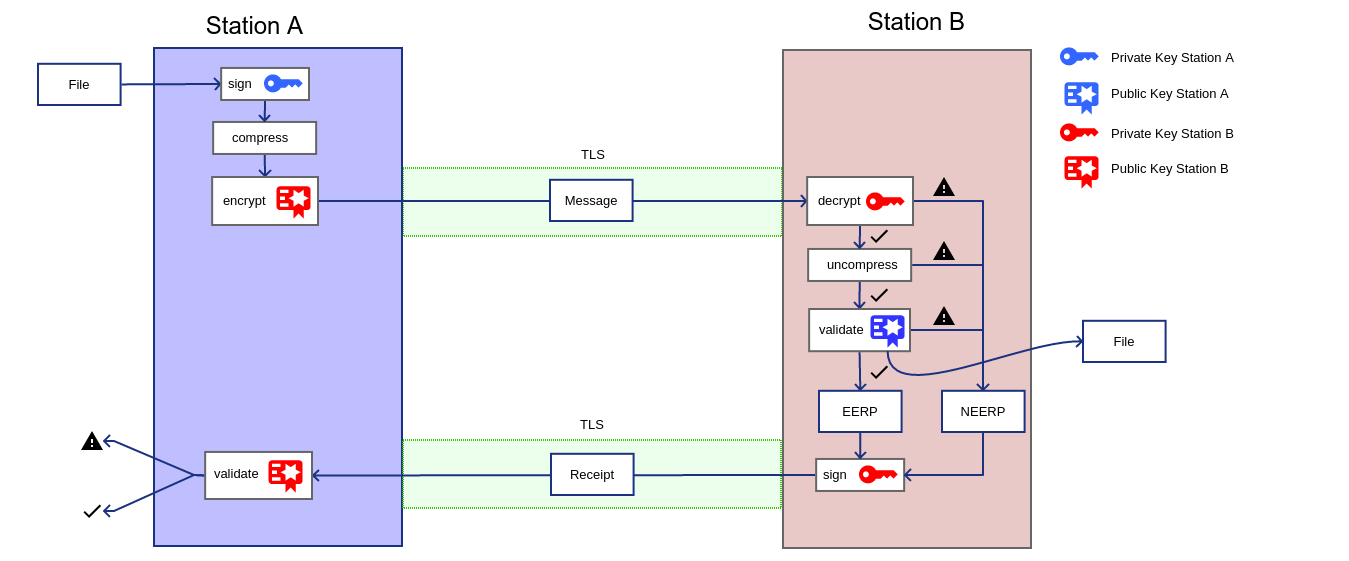
OFTP2 Station "A" is handed over a file which should be transmitted to OFTP2 station "B". Before the file is sent it is wrapped into a Virtualfile which can optionally be
- signed with the stations private key
- zip-compressed
- encrypted with the public certificate of OFTP2 station B
When OFTP2 station "B" receives the file the received file will be
- decrypted using OFTP2 station's own private key
- uncompressed
- validated.
If the incoming file has successfully been processed and the sender has requested a delivery notification, the recipient sends an acknowledgment of receipt back to the sender. This positive acknowledgment is called End-To-End-Response, or short EERP. In case the decryption, the validation of the signature, or any other step of processing of the incoming file has failed, the sender is informed of the processing-failure by the recipient with a Negative-End-Response (NERP).
OFTP2 Connection Configuration
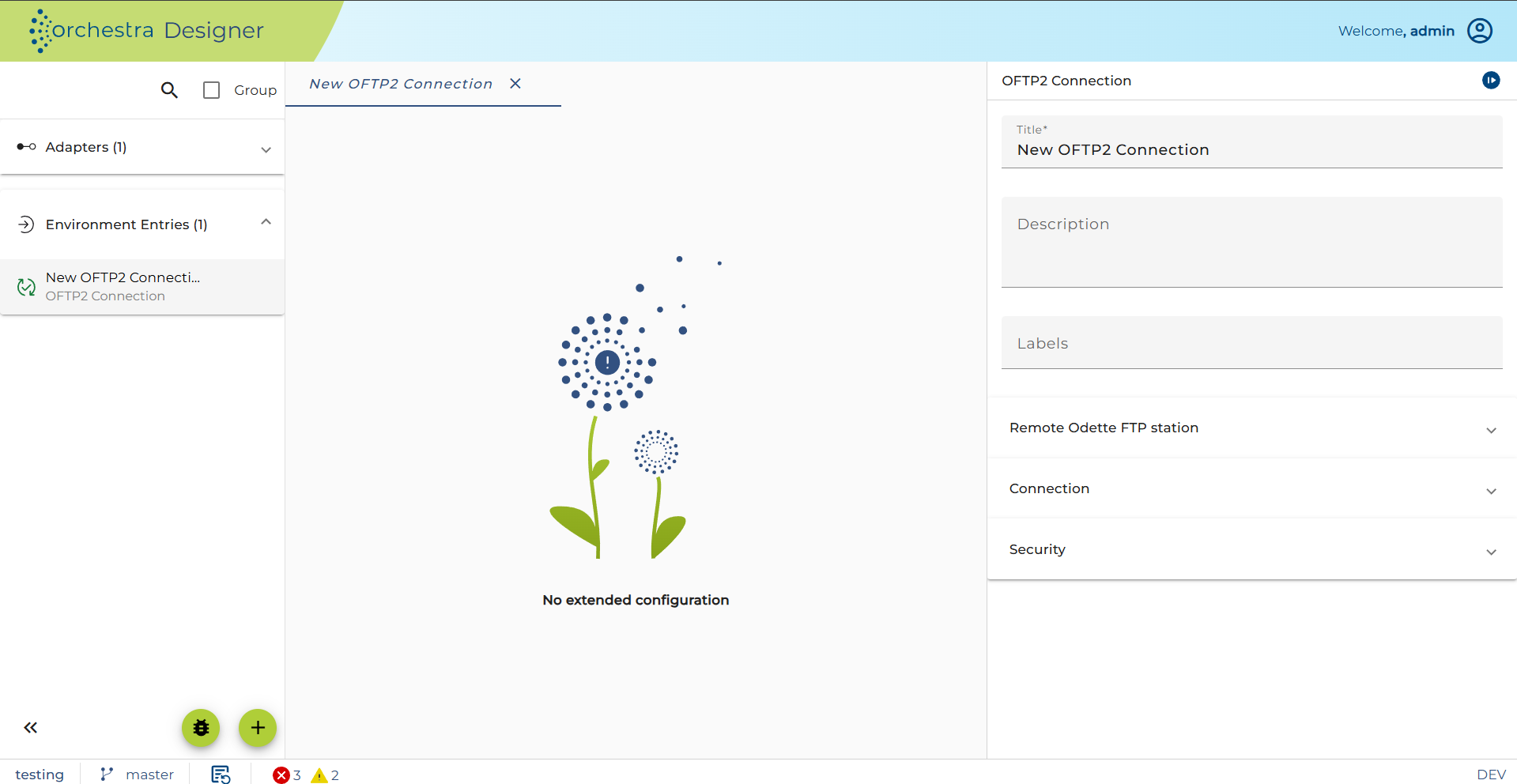
The OFTP2 Connection holds all necessary configuration to connect to a remote OFTP2 peer.
-
OFTP2 Connection: Allows selecting an OFTP2 Connection environment entry, which holds the address and Odette Identification Code of the target system, as well as the credentials used for validating signatures or encrypting outgoing files. (see OFTP2 Connection)
-
Serialization Settings: Configuration of the post-processing of the received file. (see Serializer)
-
End-To-End-Response Configuration:
- Wait for EERP: When enabled, this channel will wait for the EERP delivery notification from the remote system. This means the process model will not be executed further, creating a synchronous-like behavior. When disabled, the sender channel will NOT care for an incoming EERP. This might be useful when you want to handle incoming EERPs asynchronously with an OFTP2 File Receiver.
- Request Signed EERP: When you want to receive an EERP signed by the remote station.
- Synchronous Timeout: This timeout describes how long the OFTP2 File Sender will wait for a "synchronous" EERP (see "Wait for EERP").
-
Processing of Outgoing Files:
- Compress: Zip-compress outgoing files.
- Sign: Sign outgoing files with the private key of the Orchestra OFTP2 Service.
- Encrypt: Encrypt the outgoing file with the public key of the remote partner. This public key is defined inside the selected OFTP2 Connection environment entry.